
Your team's AI
helpdesk, right inside Microsoft Teams.
Instant answers. Self-service IT. Real humans when you need them. Grounded in your environment — not the public internet.
What QIT Assist does
The fastest helpdesk ticket is the one your team never has to file.
QIT Assist handles the everyday IT requests that used to clog up your day — instantly, in Teams, without a ticket queue.
Identity & access
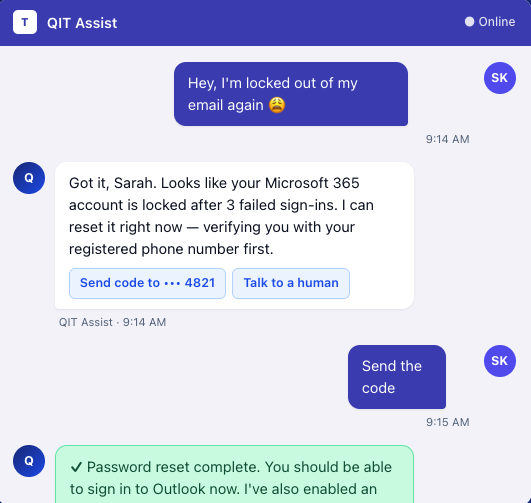
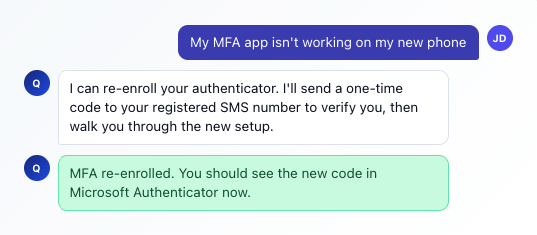
Instant password resets & MFA help
The single biggest helpdesk category — solved in under a minute. Your team unlocks themselves through a secure, verified flow right inside Teams. No phone calls, no waiting.
How-to & documentation
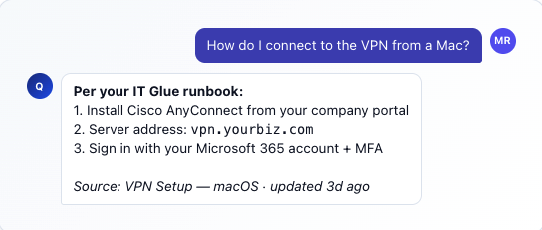
Grounded answers from your real documentation
QIT Assist isn't a generic chatbot trained on the open internet. It's grounded in your IT Glue documentation, your runbooks, and your environment — so the answers it gives are right for your business, not somebody else's.
Onboarding & offboarding
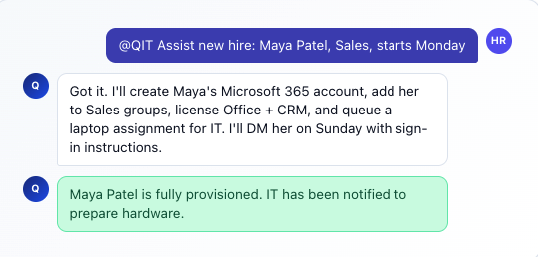
New-hire and departing-employee workflows
Onboarding a new team member used to mean a chain of tickets to IT. QIT Assist runs the workflow itself — accounts created, licenses assigned, groups added, hardware tracked — and tells the human team only what they actually need to touch.
Hand-off to humans
Knows when to bring in a real person
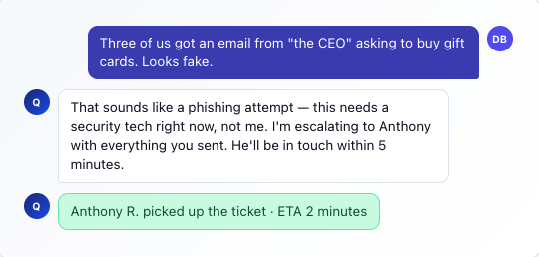
QIT Assist is honest about its limits. The moment something needs a human — a complex issue, a security concern, an unhappy customer — it hands off cleanly, with all the context from the conversation attached, so the technician picks up where the AI left off.
Full capability list
Everything QIT Assist can do.
A growing library of skills built specifically for IT support inside Teams.

Password & MFA
Self-service resets, account unlocks, MFA enrollment, and authenticator app help.

How-to questions
"How do I share a file?" "How do I set up email on my phone?" — answered from your real docs.

Onboarding
End-to-end new-hire setup: accounts, licenses, group memberships, hardware tracking.

Software access
License requests, app installs, permission changes — routed through your approval workflow.

Printer & device help
"My printer stopped working" — diagnosed and fixed without a service call.

Email & calendar
Distribution list adds, shared mailbox access, calendar permissions, signature setup.

VPN & remote access
Connection troubleshooting, VPN setup on new devices, remote access permissions.

Security awareness
Phishing reports triaged, suspicious activity escalated, security questions answered.

Ticket status & updates
"What's the status of my ticket?" — checked in real time against your PSA.
How it works
From install to in-use in a single afternoon.
QIT Assist installs directly into your Microsoft Teams tenant. No new app for your team to learn.
Built for your industry
Tuned for the businesses we serve.
QIT Assist isn't a one-size-fits-all bot. We tune it to the workflows, terminology, and compliance posture of your industry.

Healthcare
HIPAA-aware. Built around clinical staff workflows and PHI-safe communications.

Law firms
Conflict-of-interest aware. Tuned for matter management and legal document workflows.

Financial
GLBA-conscious. Strong audit trail for every interaction touching customer data.

Architecture & Engineering
CAD & BIM file management, project access, large-file handling, plotter help.

Manufacturing
Shop-floor friendly. Fast access for shift workers and field crews on shared devices.

Nonprofits
Volunteer-friendly. Lightweight onboarding for staff turnover and shared accounts.

Professional services
Client-facing teams, project-based billing, time-sensitive workflows.

Home services
Field-team friendly. Quick mobile-first access for techs working in the field.
Trust & security
AI you can actually trust with your business.
Three principles we hold ourselves to with QIT Assist — non-negotiable.
Your data stays yours
QIT Assist operates inside your Microsoft 365 tenant. We do not train AI models on your data, your conversations, or your documentation. Period.
Every action is auditable
Every reset, every permission change, every conversation — fully logged with timestamps, the user who triggered it, and what QIT Assist did. Searchable, exportable.
Humans stay in the loop
For anything high-risk (security incidents, sensitive permissions, unusual activity), QIT Assist hands off to a human. The AI is your team's accelerator, not their replacement.
What QIT Assist actually delivers.
Numbers across QIT's deployed environments. Your results will be your own — but this is the direction.
47s
Average self-service resolution time
62%
Of password-reset tickets resolved without a human
24/7
Availability — no after-hours wait queue
100%
Of conversations logged for audit
"
QIT Assist handled my password reset in Teams before I'd even finished my coffee. I didn't have to call anyone. I didn't have to wait. It just worked.
RP
Real person, real morning
A QIT client who'd rather not be on hold
Common questions
About QIT Assist.
Bring QIT Assist to your team
Give your team an AI helpdesk that actually helps.
Schedule a 20-minute call. We'll show you QIT Assist live in Teams and walk you through what it would look like inside your business.